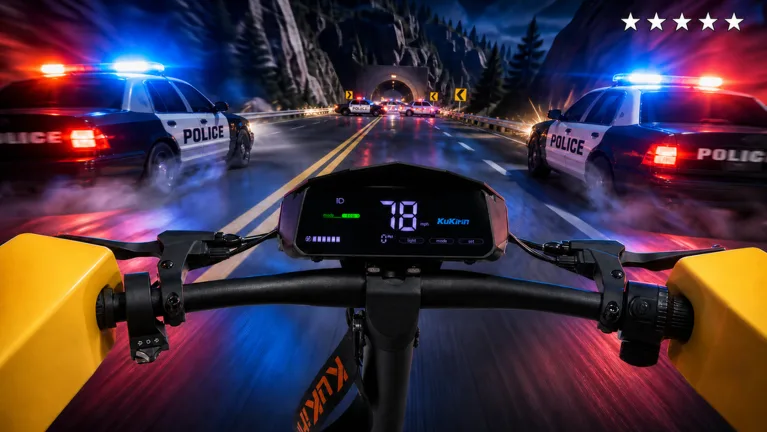
How to Drive a Kukirin in First-Person Mode: Roblox Guide
Learn how to switch to first-person view in Drive A Kukirin on Roblox and discover expert tips to master your electric scooter controls and earn cash faster.
Published: ( UPDATE) Drive A Kukirin Wiki Editorial Team
Table of Contents
Switching to First-Person Mode in Drive A Kukirin
To enhance your immersion in the realistic electric scooter simulation of Drive A Kukirin on Roblox, you can easily switch your camera perspective. According to community experience and current game mechanics, you simply need to press the "C" key on your keyboard while operating your vehicle. This toggles the camera into a first-person POV, allowing you to experience the game’s driving physics from the rider’s perspective.
Switching views is particularly useful for navigating tight corners or simply enjoying the high-fidelity detailing of the e-scooters included in the game, such as the KuKirin, Ausom, and Dualtron models. Whether you are cruising on the highway or exploring the map's various European-inspired neighborhoods, the first-person mode provides a more grounded and tactile sensation of speed and control.
Mastering Scooter Controls and Tricks
Beyond the camera view, understanding the core control scheme is vital for any player looking to transition from a beginner to a professional rider. The game focuses on realistic physics, and mastering your movement is the primary way to earn in-game currency.
Steering: Use standard movement keys to navigate the open-world map.
First-Person Toggle: Press "C" to switch your camera view.
Trick Controls: Press "1" for a one-handed trick and "2" to ride no-handed.
Wheelies: Use the "Shift" key to initiate a wheelie; this is essential for completing performance-based quests.
Players report that holding wheelies is a skill-based mechanic that requires practice. While it might be challenging at first, maintaining a wheelie for extended periods is a core requirement for several high-paying quests. If you find yourself struggling, focus on finding open, flat stretches like the highway to practice your balance.
Strategies to Earn Cash Efficiently
In Drive A Kukirin, money is earned by driving, completing quests, and participating in dynamic events like police chases. While driving around the map provides a steady stream of passive income, it is not the fastest method for progression.
Prioritize Quests
The most effective way to stack up cash is by actively checking and completing your daily and weekly quests. Players have noted that claiming these rewards can net you hundreds or even nearly a thousand dollars at once, which is significantly more lucrative than passive driving alone. Always check your quest menu before you start riding to ensure you are working toward your current objectives.
Upgrade Your Gear
As your bank balance grows, you should look toward upgrading your equipment. Faster scooters not only improve your exploration speed but also increase the rate at which you generate cash while riding. Keep an eye on the garage shop, where you can view the top speeds and prices of advanced scooters, such as models that can reach 65 mph.
Tips for a Better Riding Experience
To maximize your time in the game, consider the following insights gathered from the community:
Tip
Avoid Spending on Housing: While you can purchase houses, community feedback suggests that focusing your initial capital on scooter upgrades is more beneficial for your long-term progress.
Participate in Police Chases: Getting involved in police interactions can increase your earnings and add excitement to your commute.
Customize Your Ride: Visit the customization shop to personalize your scooter's accents and colors; this doesn't change physics but adds to the personal enjoyment of your vehicle.
While there have been rumors about "AFK" (Away From Keyboard) speed commands in the chat, these are generally considered non-functional or patched. It is recommended to stick to active gameplay and quest completion to ensure you are getting the most out of your time in this Roblox electric scooter simulator.
Frequently Asked Questions
Can I use a controller for these controls?
While the PC keybinds for first-person (C) and wheelies (Shift) are standard, controller support may vary. Most Roblox experiences map these functions to the D-pad or bumper buttons; it is recommended to check the in-game settings menu if you are playing via console.
Does the helmet provide a performance boost?
Based on player reports, wearing a helmet is largely a cosmetic choice for roleplay and does not offer a direct mechanical advantage to your speed or cash-earning potential.
How do I get a faster scooter?
You must accumulate cash by driving and completing quests. Once you reach the required amount, head to the in-game garage to purchase higher-tier scooters that offer increased speed and better handling.